
Demo walkthroughs and example review outputs for enquiry handling systems.
These enquiry handling examples show how Practical AI Labs can review, clean up and connect the systems behind new enquiries, CRM records, follow-up and booking handoff for plumbing, heating and HVAC businesses.
These are illustrative examples, not client case studies. They show the type of workflow logic Practical AI Labs can review or build. A real New Enquiry Handling Review would provide an enquiry path map, red-flag list, prioritised fix plan and optional implementation scope.
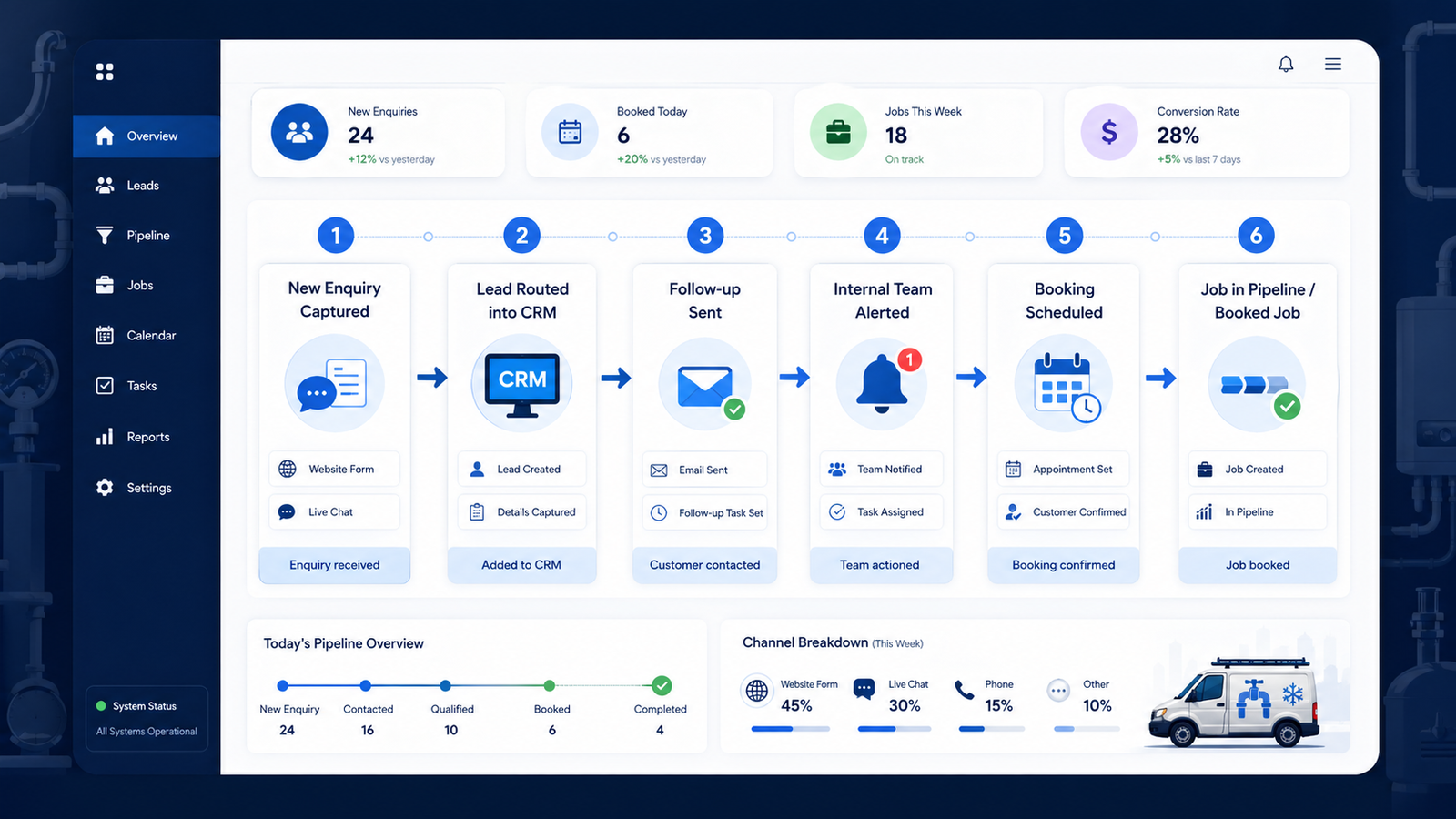
- Sample review output
- Chat-to-CRM enquiry intake
- CRM cleanup and ownership repair
- Enquiry-to-booking workflow validation
- Follow-up and internal alert automation
Enquiry handling examples across the path from first contact to booked job.
These examples cover the practical parts of an enquiry-handling system: enquiry capture, CRM routing, ownership, follow-up, booking movement and operational visibility. They are designed to show practical operating logic rather than vague AI or automation claims.
Enquiry capture
Website chat and forms collect useful enquiry details before the request reaches the team.
CRM structure
Contacts, companies, deals, ownership and pipeline records become easier to trust.
Follow-up and booking
Qualified enquiries receive follow-up while the team gets alerts and booking progress is tracked.
See what a New Enquiry Handling Review output can look like.
This sample output shows the kind of practical diagnostic document a buyer may receive after the fixed-fee £397 New Enquiry Handling Review.
It is clearly labelled as an illustrative sample, not a client case study. The purpose is to make the review tangible before a plumbing, heating or HVAC firm pays for the full diagnostic.
- One-page enquiry path map
- Checklist of enquiry routes
- Red-flag examples
- Ownership and follow-up risks
- Fix now / fix next / optional later plan
- Example implementation scope
ClearFlow Plumbing Chat-to-CRM Enquiry Intake Workflow
A website chat workflow captures plumbing enquiries, structures the customer details, updates HubSpot, creates a deal and sends follow-up automatically.
Business context
Local plumbing and heating business handling urgent repair enquiries and routine questions from its website.
Operational problem
Website chats can be missed, and staff may have to rebuild enquiry details manually before responding.
What can break
Enquiry details, urgency, location and customer context may not move cleanly into the CRM.
What the demo shows
A chat-to-CRM workflow with structured routing, HubSpot contact updates, deal creation, internal alerts and customer confirmation.
Tools used
Landbot, Make, OpenAI, HubSpot CRM and Microsoft 365 Email.
What improves
The team gets a usable CRM record and the customer receives a prompt acknowledgement instead of waiting in silence.
NorthPeak Heating & Air CRM Cleanup and Ownership Repair
A HubSpot cleanup example focused on visible data consistency, ownership repair and record-level validation across contacts, companies and deals.
Business context
Residential HVAC and home services business using HubSpot across contacts, companies and deals.
Operational problem
The CRM has mixed field formats, inconsistent record hygiene and missing ownership across key records.
What can break
Country values, phone formatting, company fields, deal ownership and associations may not be consistent enough to trust quickly.
What the demo shows
Contact fields, company fields, company owners, deal owners and record associations cleaned and validated.
Tools used
HubSpot CRM, CRM hygiene review, ownership cleanup and record-level validation.
What improves
The CRM moves toward a cleaner operating base with clearer ownership, better visible consistency and more dependable records.
Enquiry-to-Booking Workflow Validation
An end-to-end workflow showing HubSpot form capture, Make routing, CRM record creation, email follow-up, internal alerts and Calendly booking handoff.
Business context
An enquiry-to-booking workflow designed to move inbound enquiries from form submission to CRM follow-up and booked call.
Operational problem
Inbound enquiries need to be captured, qualified, followed up and advanced without relying on manual handoffs.
What can break
Forms, CRM records, follow-up emails, alerts and booking updates can become disconnected when no clear workflow exists.
What the demo shows
The workflow captures the enquiry, applies qualification logic, creates and links CRM records, sends follow-up and advances the deal after booking.
Tools used
HubSpot CRM, HubSpot Forms, Make, Calendly and Microsoft 365 Email.
What improves
The workflow shows a clear path from enquiry capture to CRM creation, immediate follow-up, internal notification and booking progress.
Want this kind of clarity in your own enquiry-handling process?
Request a free 3-point enquiry note first. If there is a fit, the next step is a 15-minute call and the fixed-fee £397 New Enquiry Handling Review.